
Board index  Programs with AI or Rules Enforcement Magic: The Gathering - Duels of the Planeswalkers Documentation
Programs with AI or Rules Enforcement Magic: The Gathering - Duels of the Planeswalkers Documentation
How To Make HQ images for Card Illustrations in DotP
Moderator: CCGHQ Admins
14 posts
• Page 1 of 1
How To Make HQ images for Card Illustrations in DotP
 by kevlahnota » 28 Jul 2010, 03:53
First Download Paint.Net 3.5.5 or later and tdxfiletype plugin. read the readme on how to install the plugin.
Paint.Net download: http://www.getpaint.net/download.html
tdxfiletype plugin: http://www.mediafire.com/?o17kpoub2p5ifpg
Step 1: Open an existing image/illustration to be edited or make a new one, size is 512 x 376.
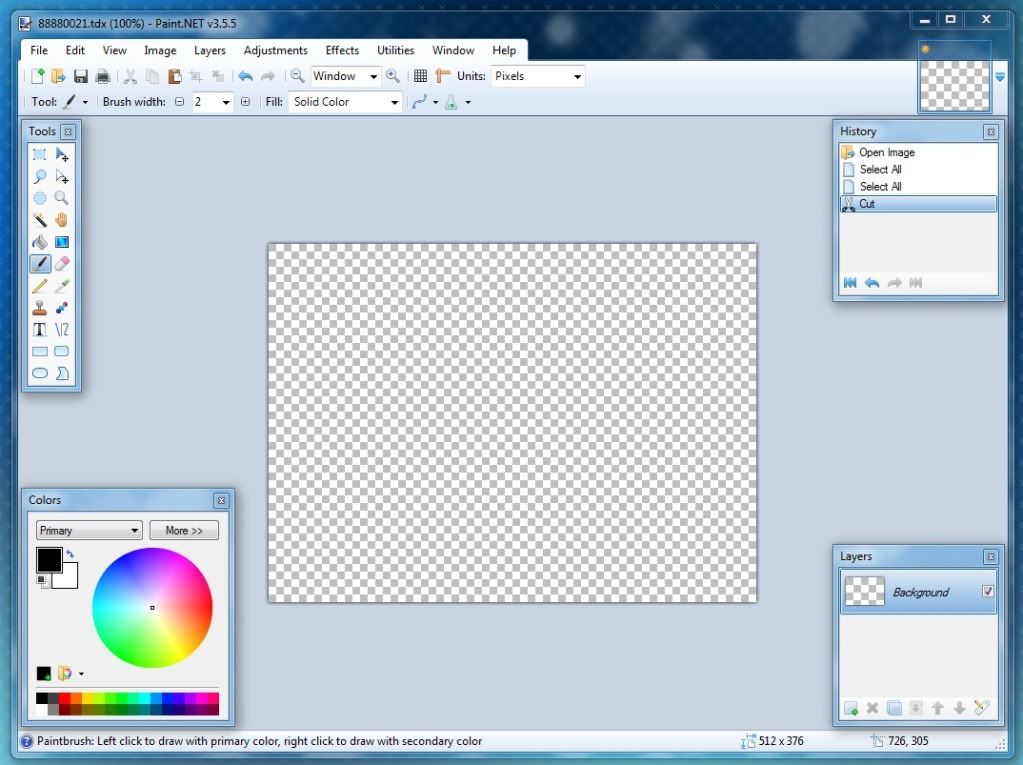
Step 2: Load or Paste your image to be edited.
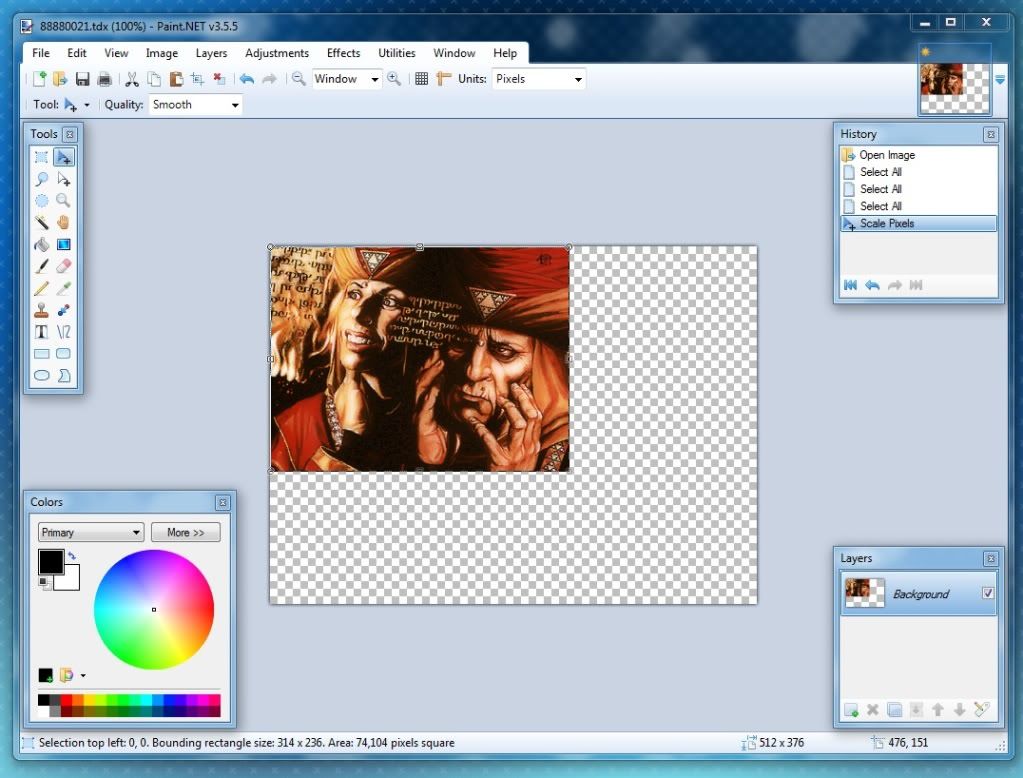
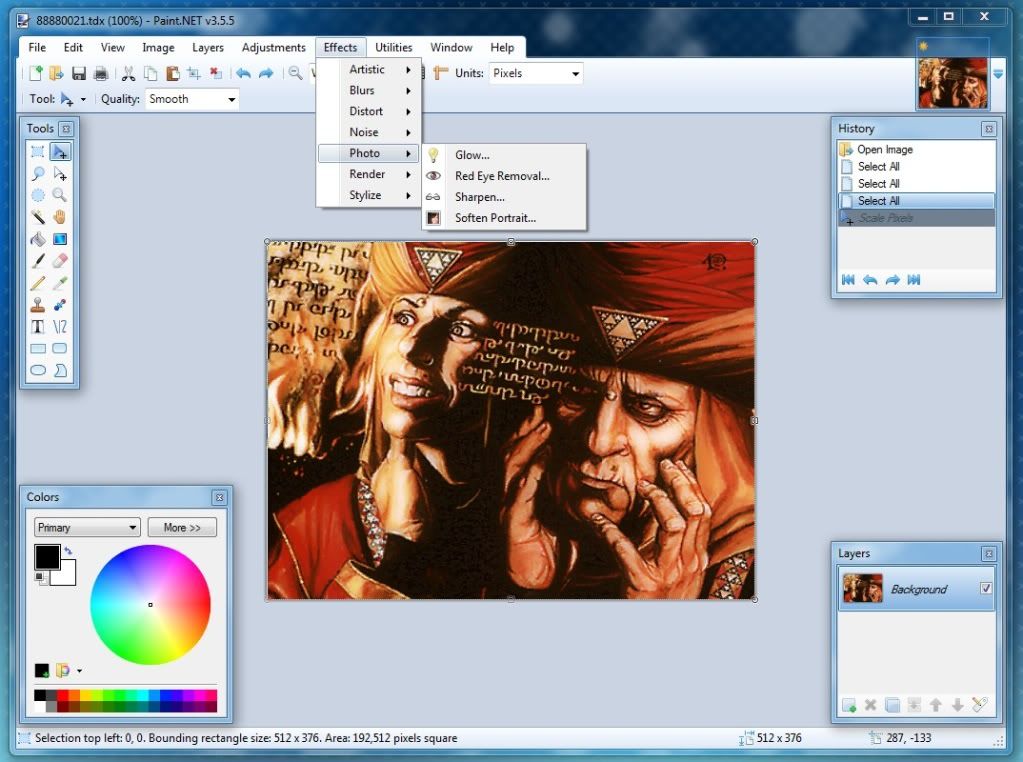
Step 3: Resize the image and use the tools to enhanced the picture.
Step 4: Save the image as xxxxxxx.tdx where x is the artId.
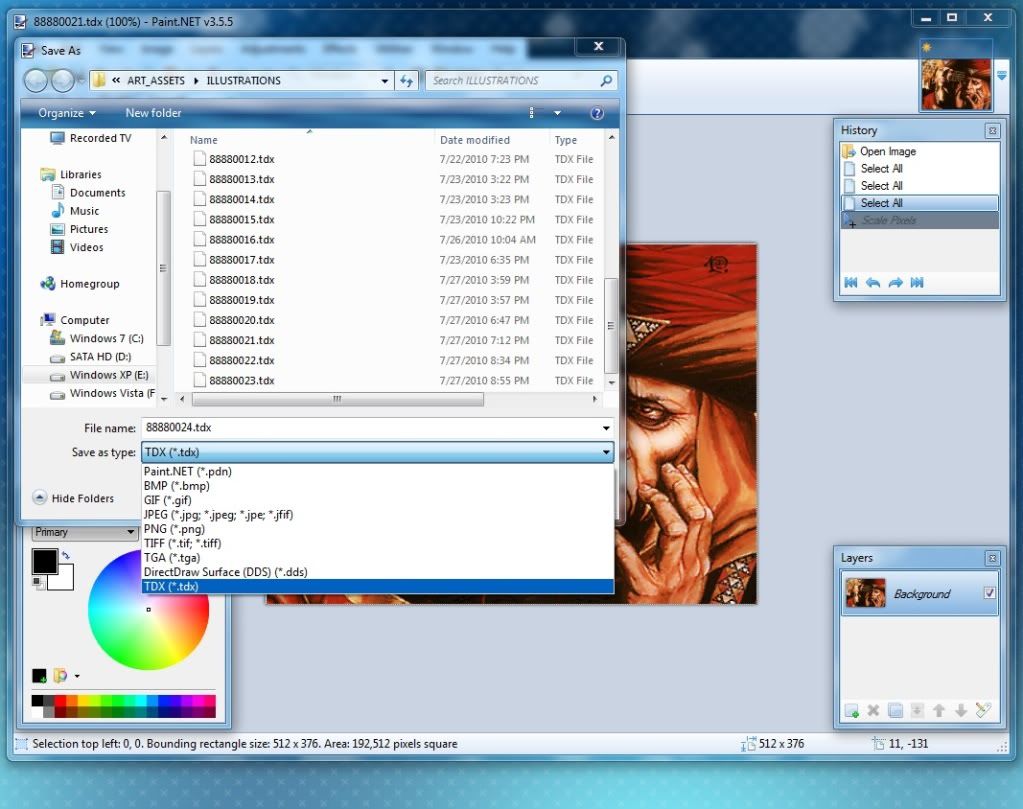
Step 5: Select DXT5 (Interpolated Alpha), Iterative Fit(Slowest/HQ), Perceptual, Check Weight color by Alpha and Check Generate Mip Maps.
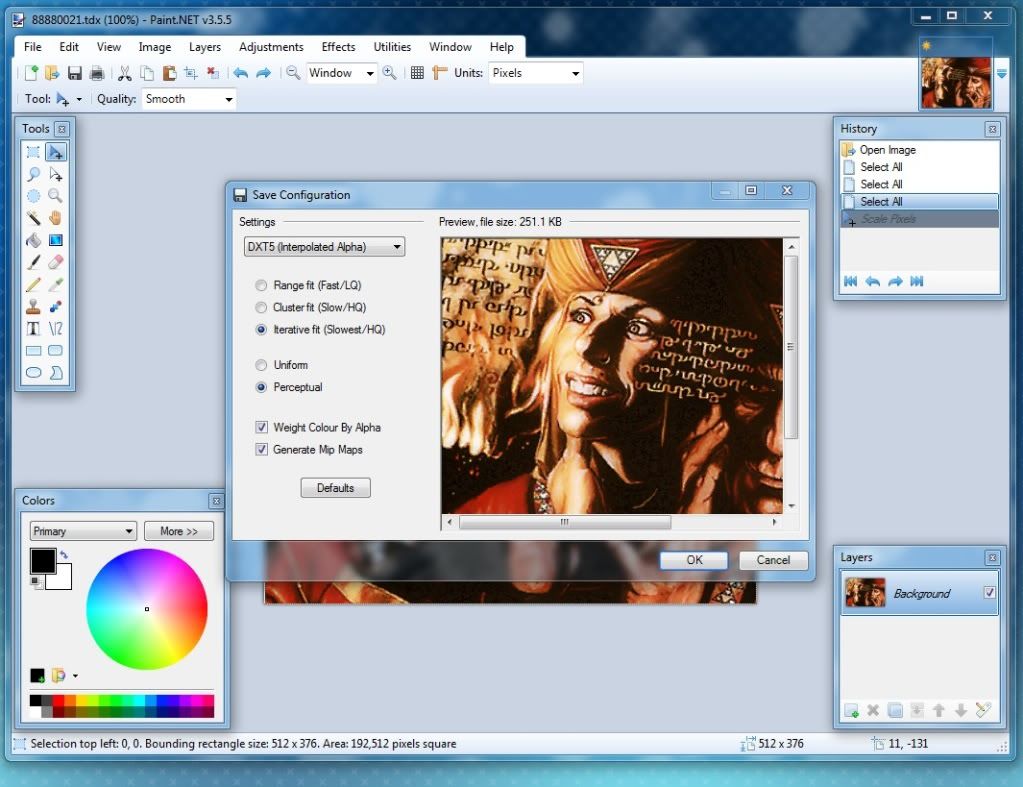
Enjoy!!!
Paint.Net download: http://www.getpaint.net/download.html
tdxfiletype plugin: http://www.mediafire.com/?o17kpoub2p5ifpg
Step 1: Open an existing image/illustration to be edited or make a new one, size is 512 x 376.
Step 2: Load or Paste your image to be edited.
Step 3: Resize the image and use the tools to enhanced the picture.
Step 4: Save the image as xxxxxxx.tdx where x is the artId.
Step 5: Select DXT5 (Interpolated Alpha), Iterative Fit(Slowest/HQ), Perceptual, Check Weight color by Alpha and Check Generate Mip Maps.
Enjoy!!!
-

kevlahnota - Programmer
- Posts: 825
- Joined: 19 Jul 2010, 17:45
- Location: Philippines
- Has thanked: 14 times
- Been thanked: 264 times

Re: How To Make HQ images for Card Illustrations in DotP
by pun1sher666 » 28 Jul 2010, 08:45
Thanks for this excellent tutorial, i will update my DLC 
- pun1sher666
- Posts: 37
- Joined: 09 Jul 2010, 13:49
- Has thanked: 0 time
- Been thanked: 0 time
Re: How To Make HQ images for Card Illustrations in DotP
by logoliv » 28 Jul 2010, 11:49
Nice tutorial indeed
In fact I've looked at the original TDX pictures with a hex editor and they're compressed with DXT1, no need to have an alpha layer... so we can uncheck the "weight color by alpha" option. As you can see the resulting file is 126k, which is exactly the size of the original game files
In fact I've looked at the original TDX pictures with a hex editor and they're compressed with DXT1, no need to have an alpha layer... so we can uncheck the "weight color by alpha" option. As you can see the resulting file is 126k, which is exactly the size of the original game files

Re: How To Make HQ images for Card Illustrations in DotP
by Yanna » 28 Jul 2010, 12:48
Nice tutorial, you should put a link on the wiki if not already done
So you can edit TDX files without the TDX converter ? nice finding !
So you can edit TDX files without the TDX converter ? nice finding !


Re: How To Make HQ images for Card Illustrations in DotP
by Uresti » 28 Jul 2010, 13:44
i dont know much about DXT but i think alpha channel is used for those "foil" in game cards BTW excellent tutorial!
- Uresti
- Posts: 151
- Joined: 25 Jun 2010, 15:26
- Has thanked: 0 time
- Been thanked: 0 time
Re: How To Make HQ images for Card Illustrations in DotP
by logoliv » 24 Aug 2010, 20:14
to kevlahnota :
I've seen you updated some pictures in the repository, and they're far more clean than the ones I managed to obtain using the cards scan They are not exactly the same as the real cards too (the view is larger and a bit verticaly stretched) so I presume you found a site with the original artworks ?
I think all modders here would be interested to know where you found the pictures and what software you use to resize them
I've seen you updated some pictures in the repository, and they're far more clean than the ones I managed to obtain using the cards scan
They are not exactly the same as the real cards too (the view is larger and a bit verticaly stretched) so I presume you found a site with the original artworks ?I think all modders here would be interested to know where you found the pictures and what software you use to resize them
Re: How To Make HQ images for Card Illustrations in DotP
by Yanna » 24 Aug 2010, 20:22
Yup, saw that too and those pictures are clearly amazing, makes the game look gorgeous !logoliv wrote:to kevlahnota :
I think all modders here would be interested to know where you found the pictures and what software you use to resize them
What's your secret ?
Re: How To Make HQ images for Card Illustrations in DotP
by kevlahnota » 25 Aug 2010, 04:52
I use Photoshop CS5, Genuine Fractals, Mask Pro, Paint.Net, and about the images, I found them on google. 
-
kevlahnota - Programmer
- Posts: 825
- Joined: 19 Jul 2010, 17:45
- Location: Philippines
- Has thanked: 14 times
- Been thanked: 264 times
Re: How To Make HQ images for Card Illustrations in DotP
by logoliv » 25 Aug 2010, 15:48
You found all cards pictures with Google ??? Damn ! 
I would be extremely interested on how do you find them, because I did searches on Google Images and it doesn't always gives the artworks as result (for example with Overgrown Tomb or Stomping Ground... can you send me the links where you found them please ?)
Same thing with Genuine Fractals, I use this to resize the pictures, but don't have the same result as you... A tutorial on the settings you use would be welcome
By the way, of all illustrations you replaced, the only one which is ugly is Geyser Glider, mine is more closer to the real card
I would be extremely interested on how do you find them, because I did searches on Google Images and it doesn't always gives the artworks as result (for example with Overgrown Tomb or Stomping Ground... can you send me the links where you found them please ?)
Same thing with Genuine Fractals, I use this to resize the pictures, but don't have the same result as you... A tutorial on the settings you use would be welcome
By the way, of all illustrations you replaced, the only one which is ugly is Geyser Glider, mine is more closer to the real card
Re: How To Make HQ images for Card Illustrations in DotP
by thefiremind » 28 Jan 2012, 12:07
I'd like to ask if someone found a way to convert card pictures to TDX using Paint.NET so that they are readable in DotP 2012. Since now, I always used Gibbed Tools, and I get TDX files that work perfectly, but the file size is high; I wanted to start using Paint.NET for the conversion, so that the size is the same as in the files included in the core, but I can't produce TDX files that work in the game. I tried with kev's settings and with logoliv's settings, the result is the same. The strange thing is that I convert frame pictures with Paint.NET and they work: only card pictures don't work.
EDIT: Nabeshin was right in the post below, card pictures must have dimensions multiple of 4 when they are compressed, otherwise the game won't read them. The recommended size is the official one, 512x376.
Here is how you should set the TDX plugin for card pictures and for other kinds of textures:
EDIT: Nabeshin was right in the post below, card pictures must have dimensions multiple of 4 when they are compressed, otherwise the game won't read them. The recommended size is the official one, 512x376.
Here is how you should set the TDX plugin for card pictures and for other kinds of textures:
- Attachments
-
Last edited by thefiremind on 22 Jan 2013, 09:58, edited 1 time in total.
< Former DotP 2012/2013/2014 modder >
Currently busy with life...
Currently busy with life...
-

thefiremind - Programmer
- Posts: 3515
- Joined: 07 Nov 2011, 10:55
- Has thanked: 118 times
- Been thanked: 722 times
Re: How To Make HQ images for Card Illustrations in DotP
by nabeshin » 24 Feb 2012, 19:53
Check up the sizes of a picture, it is very whimsical to it.thefiremind wrote:I'd like to ask if someone found a way to convert card pictures to TDX using Paint.NET so that they are readable in DotP 2012. Since now, I always used Gibbed Tools, and I get TDX files that work perfectly, but the file size is high; I wanted to start using Paint.NET for the conversion, so that the size is the same as in the files included in the core, but I can't produce TDX files that work in the game. I tried with kev's settings and with logoliv's settings, the result is the same. The strange thing is that I convert frame pictures with Paint.NET and they work: only card pictures don't work.

Re: How To Make HQ images for Card Illustrations in DotP
by castled » 24 Jun 2013, 02:23
I cannt open mediafire.com, so I find this file from other site, and upload it here for anyone who need.
- Attachments
-
 TdxFiletype.rar
- (40.25 KiB) Downloaded 744 times
- castled
- Posts: 84
- Joined: 09 Oct 2010, 14:50
- Location: Shenzhen,China
- Has thanked: 16 times
- Been thanked: 1 time
Token helper for DotP2013 and 2014
by thefiremind » 11 Aug 2013, 09:44
I just made a PSD file that might be helpful when you need to create custom tokens but you don't know if your picture will fit well into the frame. If I remember well, the first one who had this idea was BloodReyvyn, so give part of the credit to him. 
The PSD file contains both token frames, and a layer where you can paste your picture. First, set the frame you don't need as invisible, then paste your picture and resize/move as needed so that it fits perfectly into the frame window, finally set both frames as invisible, and save as PNG. There you have your token image, ready to be converted to TDX.
You can use this file with Paint.NET as well, if you install the PSD plugin. The layer group won't work, and it will show up as 2 transparent layers, but you can ignore them.
The PSD file contains both token frames, and a layer where you can paste your picture. First, set the frame you don't need as invisible, then paste your picture and resize/move as needed so that it fits perfectly into the frame window, finally set both frames as invisible, and save as PNG. There you have your token image, ready to be converted to TDX.
You can use this file with Paint.NET as well, if you install the PSD plugin. The layer group won't work, and it will show up as 2 transparent layers, but you can ignore them.
- Attachments
-
- Token Helper.zip
- PSD file that helps making custom token images
- (441.36 KiB) Downloaded 706 times
< Former DotP 2012/2013/2014 modder >
Currently busy with life...
Currently busy with life...
-
thefiremind - Programmer
- Posts: 3515
- Joined: 07 Nov 2011, 10:55
- Has thanked: 118 times
- Been thanked: 722 times
14 posts
• Page 1 of 1
Who is online
Users browsing this forum: No registered users and 9 guests